
CASHIER
Wallet status page
Check whether a DANA, OVO, GoPay or QRIS request is pending, accepted or needs attention.
god911 puts Live Roulette Grand, Crash Fast Lift, slots and sportsbook markets behind one account, with DANA and QRIS status visible near the cashier.

Casino and slots sit near the front of our home lobby, with search and category controls that remain usable on smaller screens.

Casino rooms come first, followed by slots, live tables, fishing games and sportsbook markets arranged for quick switching on mobile.
Pragmatic Play, PG Soft and Habanero sit alongside CQ9, Joker and Spadegaming in the studio strip shown from our home lobby.
DANA and QRIS provide a direct local-wallet path from the home cashier, while OVO and GoPay appear with their current request status.
Several home-screen routes deserve a closer look before you open a game. The cashier explains wallet and bank steps, the live lobby separates dealer tables, and the sports area groups markets by…



Four checks make the home screen easier to use from your first visit. Confirm the access terms, complete phone verification, inspect the lobby categories and locate…
Open the account form from the home screen, enter the requested details and complete the phone verification step. Account access appears only after the required fields and verification check are accepted.
Use one account for casino rooms, sportsbook markets and supported local wallets. Keep your phone number current because account checks and access recovery may rely on the verified number.
Browse slots, live baccarat, roulette, Dragon Tiger, blackjack, fishing rooms and sports markets for football, badminton and basketball directly from the main category row.
Keep your password and phone verification code private. If a session looks unfamiliar or access stalls, stop at the home screen and contact our help channel before continuing.
The mobile home screen keeps login, category search, wallet status and Help in one browser path, with no separate app claim.
Phone verification creates a clear checkpoint before account access, and your session should remain under your control on every device.
Complete the phone check requested during the account path. The verified number supports access checks and gives us a reference when you ask for account assistance.
Close your session after using a shared phone, tablet or computer. Do not save credentials on a public browser, and never send a verification code through an unrelated message.
Use transaction history to compare the method, amount and status with your receipt. Avoid repeating a cashier request while the first one still shows as pending.
Read the title or table panel before entering. Rules differ across slots, live roulette, crash rounds and fishing rooms, so each game should be checked on its own.
Scattered links and old payment screenshots make account checks harder than they need to be.
The home categories point to active casino rooms and sports areas. Saved outside links may not reflect a room change, maintenance state or updated access path.
The cashier displays the current request state beside your account activity. An old screenshot cannot show whether a pending transaction has since changed.
Transaction records help you connect a receipt with the correct wallet request. This is clearer than searching through unrelated messages or multiple browser tabs.
Profile and verification status remain under your account menu. You can confirm the verified phone path before asking us to investigate login access.
Footer links provide the terms and privacy wording attached to the home page. Copied text elsewhere may be incomplete or no longer match the current path.
Help sits close to login and cashier activity, allowing you to report the exact screen and status involved instead of describing an unknown outside page.
Game characteristics vary by title, studio and room configuration, so we do not apply one figure to the entire home lobby.
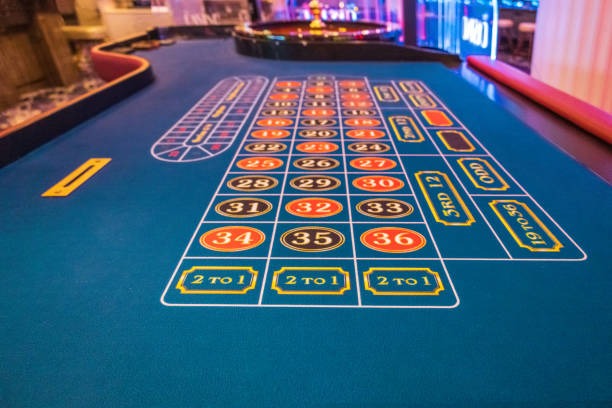
Check the title panel for studio-supplied return data and feature rules.
Read the table rules, available seats and stated wager conditions before entry.
Inspect the round mechanic and cash-out controls shown for Crash Fast Lift.
Open the room rules for Fishing War Quick Arena before choosing a session.
Compare baccarat, roulette, Dragon Tiger and blackjack rules by room.
RTP percentages are informational reference values from provider documentation. Actual session outcomes vary.
Our home page is configured for Indonesia, including local wallet names, bank context and mobile browser behaviour. You may reach the same lobby from Surabaya on a phone or from another supported area on desktop, but access depends on local law. We do not use a map to imply universal eligibility. Check the terms linked in the footer and confirm that account access is permitted for your location before entering the cashier or any game room.
Six visible elements shape your route through the home screen: clear categories, named games, local wallets, receipt status, device-aware navigation and nearby help.
These answers cover the practical questions you may have when opening the god911 home page for the first time. They explain what appears in the lobby, how mobile navigation works, which Indonesia payment rails are named, where account verification begins and how to contact us about a receipt. Access depends on local law, so read the linked terms for your location before using any account, cashier or game function.
Begin at the category row, where casino, slots, live tables and sportsbook routes are separated. Next, open your account menu to confirm phone verification and profile status.
Start with slots, live casino, fishing or sportsbook from the home row. Search by title when you already know the room you want.
Check that phone verification and access are complete before using the cashier. Correct account details help us handle later questions more accurately.
Select DANA, OVO, GoPay, QRIS, virtual account or bank transfer only through the current cashier path and keep the resulting receipt.
Check transaction history before contacting us. If the status remains unclear, send the reference through the live chat or email route shown in Help.